Know when your AI chat is running out of room
ContextMeter shows how full the context window of your ChatGPT or Claude chat is, tells you before answers start slipping, and carries the chat into a fresh one with a single click.
- Free, no account
- Nothing leaves your browser
- Chrome, Edge and Firefox
Store links will appear here once the extension is approved. In the meantime, try the free token counter.
~0 of 16K tokens
Plenty of room
In short
What is ContextMeter?
ContextMeter is a free browser extension for Chrome, Edge and Firefox that shows how full the context window of a ChatGPT or Claude chat is. It counts the tokens in the conversation, shows the percent of the window used with a gauge that turns amber and red, detects your ChatGPT plan, and offers a one-click handoff that moves the conversation into a fresh chat with a structured summary. It runs entirely on your device: no account, no analytics, no servers, and message text is never stored. It is independent and not affiliated with OpenAI or Anthropic.
New to this? Read what the ChatGPT context window is, when to start a new chat, or compare token counter extensions.
The problem
Long chats quietly get worse
Every reply is written from your whole conversation. As it grows, the model has more to juggle, older details fall away, and the chat starts forgetting what you decided. Neither site tells you how close you are.
It forgets
Early requirements and decisions drop out of view, and the answers stop matching what you asked for.
It repeats itself
Fixes you already rejected come back, and corrections stop sticking.
You find out late
There is no gauge in the chat, so you usually notice only after an hour of worse answers.
What you get
A meter in the corner, and a way out when it fills
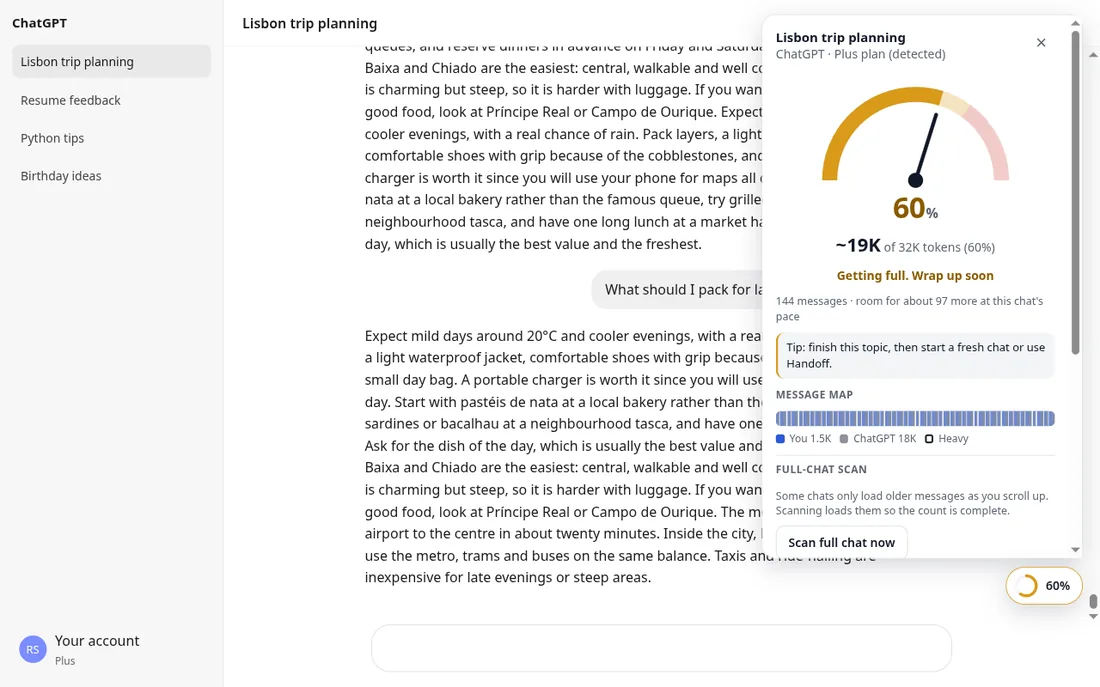
Below is the real extension on a sample conversation, not a mock-up.
See how full the chat is, at a glance
A small percent pill sits beside the chat and turns amber, then red. Open it for tokens used, about how many more messages fit, and a strip showing which messages take the most space.
On ChatGPT it detects your plan (Free, Plus, Pro) and the model from the page, so the number is measured against the right window. You can override any limit.
Move to a fresh chat without losing the thread
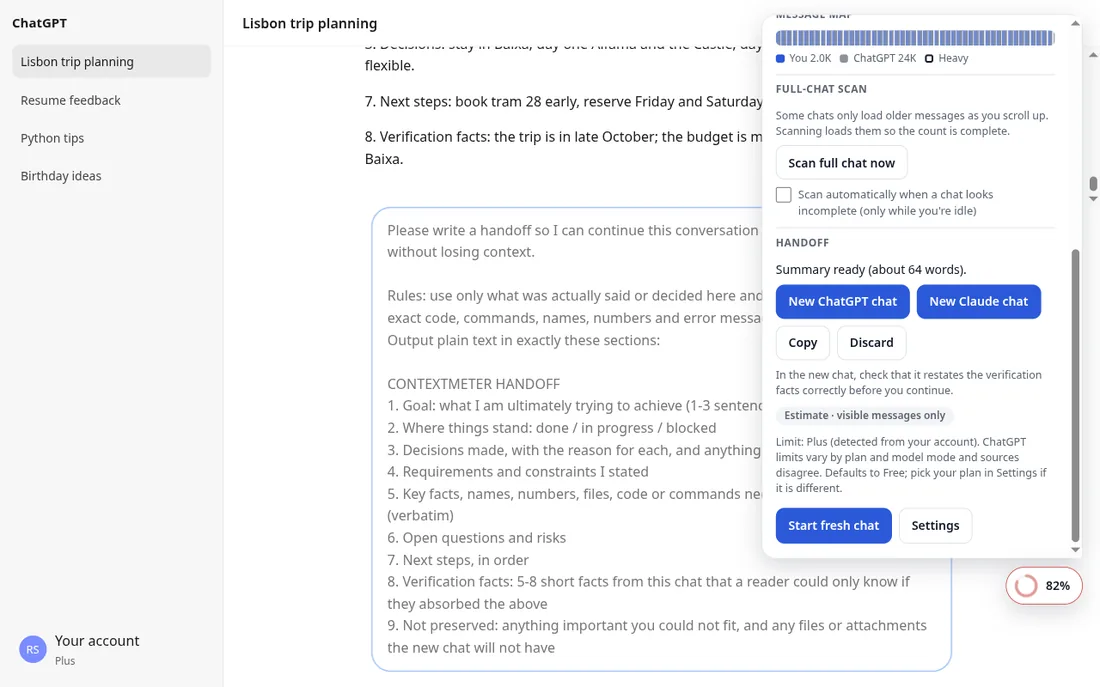
When the chat is nearly full, Handoff asks the AI for a structured summary: goal, decisions, constraints, key facts, next steps. Then it opens a fresh ChatGPT or Claude chat with that summary pre-filled.
You press Send yourself, and the new chat is asked to restate the key facts so you can see it understood.
Counts the whole chat, even long ones
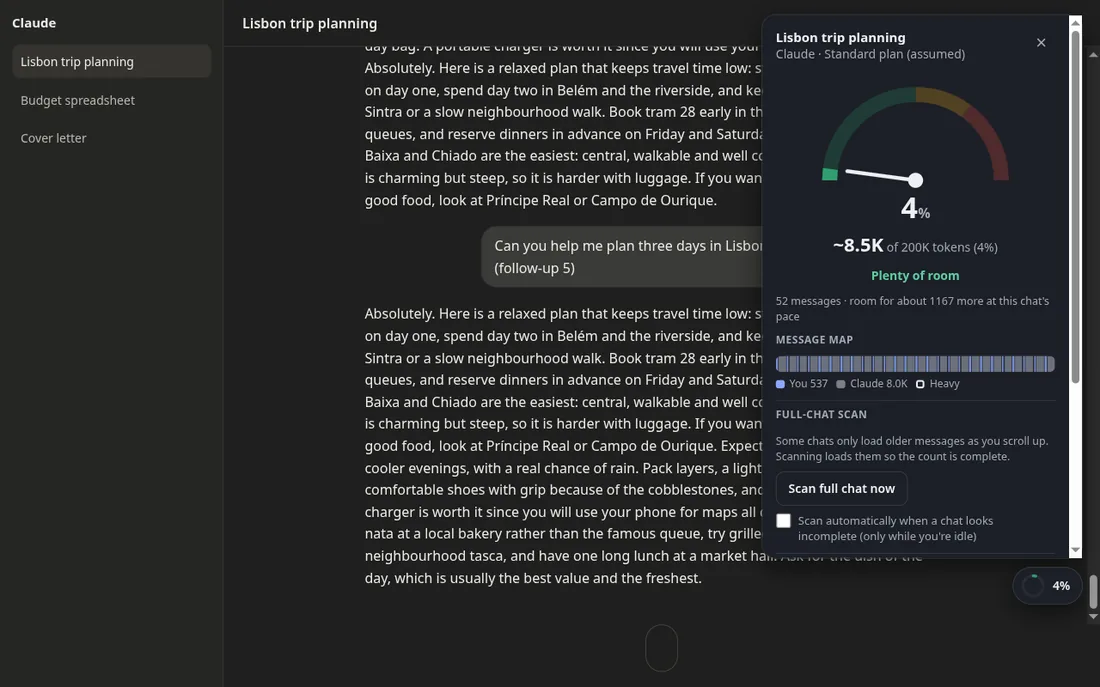
ChatGPT and Claude open long chats showing only the newest messages and load the rest as you scroll. So a naive counter under-reports. With your permission, ContextMeter reads the full chat quietly while you are idle, puts you back where you were, and remembers the result.
It asks first, shows a card while it works, and has a Stop button and an off switch.
How it works
Three steps, no setup
Install it, open a chat, and keep an eye on the corner.
Open a chat
On ChatGPT or Claude, a small percent pill appears next to the chat.
Check the details
Click it for tokens used, room left and the biggest messages. Press Alt+Shift+M if you prefer the keyboard.
Hand off when it is red
Start a fresh chat with a summary of everything that mattered, instead of starting from zero.
Handoff
Start fresh without starting over
When a chat is full, the usual advice is "start a new one", which throws away everything the model learned about your task. Handoff keeps the useful part.
- Asks the AI for a structured summary: goal, decisions, constraints, key facts and next steps.
- Opens a fresh chat with it pre-filled, on ChatGPT or Claude.
- Includes a self-check so you can see the new chat really understood. You always press Send.
Privacy
Built so you can trust it
An extension that reads your chats should earn trust. This one is deliberately boring about it.
What it does
- Counts the messages shown on the page, in your browser.
- Remembers message ids and token counts so chats open instantly.
- Runs only on chatgpt.com and claude.ai.
What it never does
- Send your chats, counts or anything else to a server.
- Store message text.
- Require an account, run analytics or show ads.
Context limits
How big is your window?
It depends on the model and plan, and the numbers change often. These are the defaults the extension starts with; every one is editable.
Sources disagree and OpenAI and Anthropic change these. See the full table with sources.
Free tools and guides
Useful even before you install
Questions
Frequently asked
What is a context window?
It is the amount of text, measured in tokens, that an AI model can consider at once. Your prompt, the whole chat so far and the reply all have to fit. When a chat gets close to the limit, older parts are dropped or matter less and answers get worse.
Is the count exact?
No. ContextMeter counts the message text visible on the page. The model's real context also includes things the page does not show, like system prompts, memory, tool output, hidden reasoning and attachments, so treat the number as a guide. ChatGPT chats use a real tokenizer; Claude uses an estimate because Anthropic does not publish an in-browser tokenizer.
Does it read or send my chats?
It reads the visible messages in your browser to count them. Nothing is sent anywhere, there are no accounts or analytics, and message text is never stored; only message ids and token counts are remembered so a chat you have scanned loads instantly next time.
Why does it scroll or reload my chat?
ChatGPT and Claude load long chats in pieces, so the only way to count a whole chat is to load it. If you allow it, ContextMeter does this quietly when you are idle, puts you back exactly where you were, and remembers the result. It asks first and has an off switch in the panel and in settings.
Which sites and browsers does it support?
ChatGPT and Claude on Chrome, Edge and Firefox. Gemini and DeepSeek are planned.
Is it free?
Yes. There is no paywall and no account.
Is it affiliated with OpenAI or Anthropic?
No. It is an independent tool.
Questions, bugs or ideas?
Write to us at [email protected]. We read every message.
Stop guessing how full your chat is
Free, private and small. Install it once and glance at the corner.